

6 Tips for Creating an Accessible Website
Having a website is essential these days, for both businesses and individuals. However, not everyone can access them in the same way. Some people have visual, hearing, or motor difficulties, which can make accessing your website difficult or even impossible. Therefore, it's important to create an accessible website that can be used by everyone, regardless of their limitations.
In this article, we'll present 6 tips for creating an accessible website and ensuring it's accessible to everyone. From color choices to content organization, every detail can make a difference when it comes to making your website accessible.
Let's go?
1. Choose appropriate colors and fonts
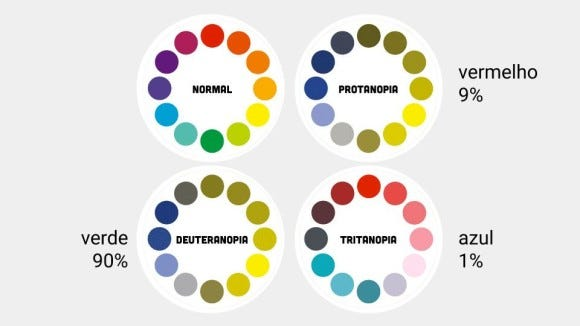
The choice of colors and fonts may seem like a detail, but it is essential to ensure the accessibility of your website. Some people have difficulty reading texts with very light or very dark colors, for example. Furthermore, very small or stylized fonts can also hinder readability.
To create an accessible website, choose colors with adequate contrast and legible fonts. Some examples of colors with good contrast are:
- Black and white
- Dark blue and white
- Dark red and white
- Dark green and white
Also, choose fonts with good legibility, such as Arial, Verdana, or Tahoma. Avoid overly stylized fonts or fonts with very small sizes.
2. Use descriptions in images and videos
Images and videos are essential for making your website more engaging and informative. However, some people may have difficulty understanding what's being shown in an image or video. Therefore, it's important to include descriptions for each image or video.
When adding an image or video, include a short, concise description of what's being shown. This will help visually impaired people understand the content of the image or video.
3. Use subtitles and translations in videos
In addition to descriptions, it's important to use subtitles and translations in videos. This will allow people with hearing impairments to understand the video's content.
When adding a video, include subtitles in Portuguese and, if possible, in other languages. Also, allow users to choose the subtitle language if they don't understand the video's original language.
4. Use large, spaced buttons
People with motor impairments may have difficulty clicking small buttons or buttons that are too close together. To create an accessible website, it's important to use large, well-spaced buttons that can be easily clicked by people with motor impairments.
Also, avoid using buttons with images that are too small or difficult to read.
Google has a user experience guide for websites on the internet that may be interesting for you to understand more about this.
5. Organize content clearly
Organizing your website's content is also crucial to ensuring accessibility. Use clear, objective titles and subtitles that allow users to quickly understand the topic covered in each section.
Additionally, organize your content in a logical and structured manner. Use lists or bullet points to highlight important information and avoid long blocks of text, which can be difficult to read.
6. Use assistive technologies
There are several assistive technologies that can help people with visual, hearing, or motor impairments access your website. Some of the main technologies are:
- Screen readers: allow visually impaired people to hear website content read aloud.
- Virtual keyboards: allow people with motor difficulties to use a virtual keyboard instead of a physical keyboard.
- Screen magnifiers: allow people with visual impairments to enlarge the size of letters and images on the screen.
When creating an accessible website, it's important to consider the use of these technologies and ensure your website is compatible with them.
Conclusion on how to create an accessible website
Creating an accessible website is crucial to ensuring it's accessible to everyone, regardless of their disabilities. From color choices to the use of assistive technologies, every detail can make a difference when it comes to making your website accessible.
By following the 6 tips outlined in this article, you can create an accessible website and ensure it's accessible to everyone. Remember to test your website before publishing and use available online tools to identify potential accessibility issues.
With these tips, you can create an accessible website and reach more people, regardless of their limitations.



Leave a Reply
Want to join the discussion?Feel free to contribute!